 edelkrone control
edelkrone control
edelkrone control
Heads, slider, jib, dolly and tripod at once, with mouse, keyboard, a PlayStation controller or a DaVinci Resolve Micro Panel. Save scenes across every unit, build moves and play them back exactly the same.
From €79 for the first year excl. VAT. All updates for a year included.
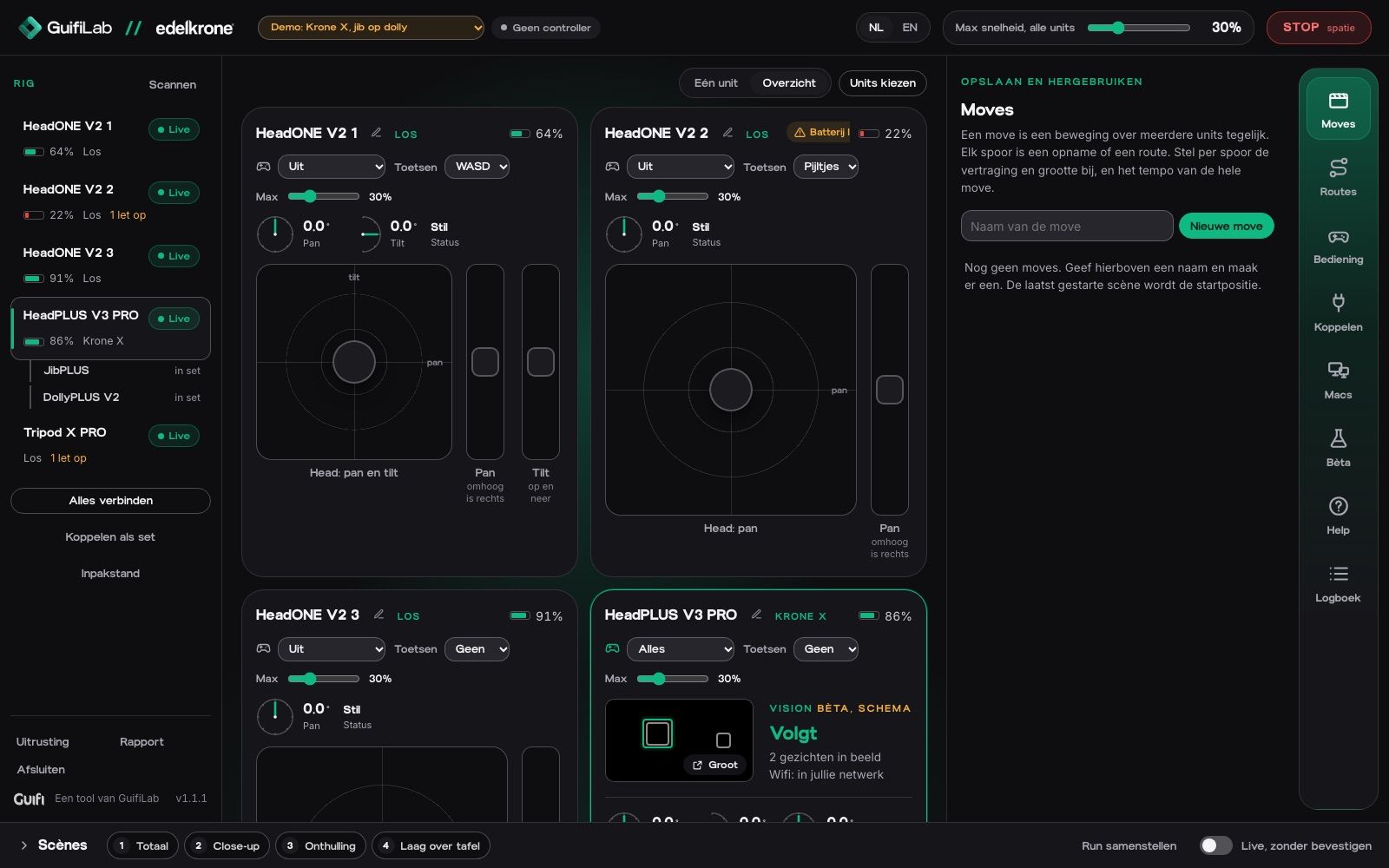
The official edelkrone app is made for one phone. When edelkrone released its SDK, we did what we always do at Guifi: push the limits, just get started and make the tools better. So we built edelkrone control: a Mac app that drives heads, slider, jib and dolly together from one screen, with a real controller in your hands.
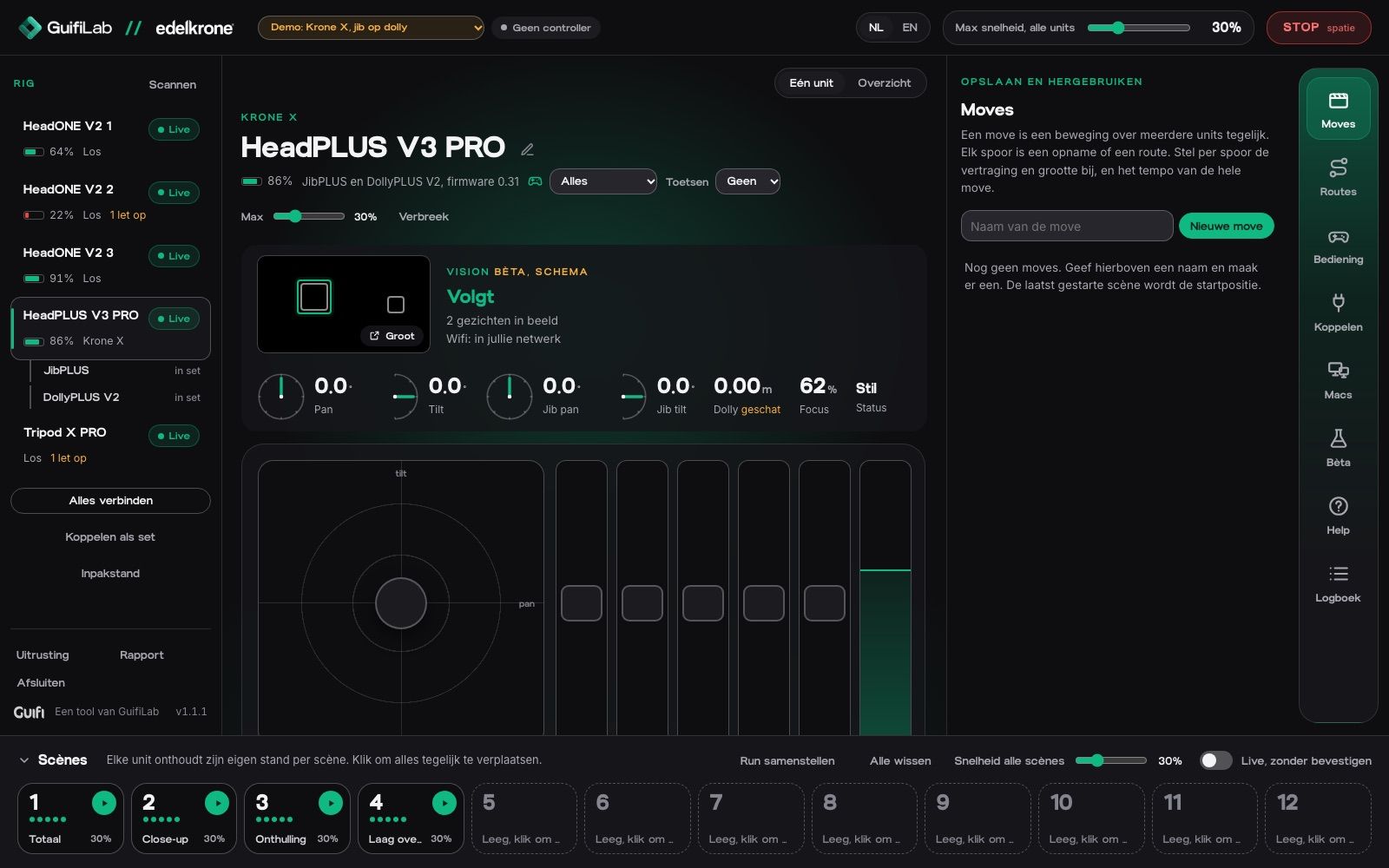
See what it doesEvery unit gets its own controls, with live readouts of pan, tilt, slider, jib and focus. Scenes sit at the bottom, one click away.
GuifiLab is the development team of Guifi. We also shoot video ourselves, and when a tool is missing, we build it. edelkrone control started as a tool for our own shoots.
About GuifiEverything the edelkrone SDK allows, combined smartly. Where the SDK measures, the app corrects; where it reports nothing, the app works it out.
Drive all units together, each with its own top speed that the app enforces.
Routes and moves steer on speed and read the position back on the way, so everything arrives where it should, even though the SDK cannot drive to coordinates yet.
The app learns how fast each axis of each unit really moves, and plans every move around it.
Twelve scenes for the whole rig, including tripod height and focus. After a power cycle the app puts them back on the units in one click.
Click the compass or the bar and the axis drives there. Set a left and right limit on the slider: it slows down and stops there, and runs back and forth as often as you like, with its own speed out and back.
Record moves per unit, combine them, and set delay, size and tempo per track.
Turn HeadPLUS, slider, jib and dolly into a Krone S or Krone X, right from the app.
Let go or lose the connection and everything stops within half a second. Space always stops.
GuifiLab builds the interface; how it works also depends on edelkrone (SDK and firmware) and Apple macOS. Not an edelkrone product. Only update firmware after our message. What works with what
Pan, reveal, crane, parallax, jib swing, dolly runs and tripod column. Back and forth as often as you like.
Play scenes one after the other in your own order, with a pause in between, once or on repeat.
Control the rig from a second Mac on the same network, protected with an access code.
Start scenes and moves from your control room over plain HTTP.
Tracking status, faces in view and the live camera image, in a window you can move to a second screen.
One click sends every unit back to its travel position.
The app tells you when a new version is ready and installs it in one click.
Switch language at any time.
Prices excluding VAT. Intro prices for the first year, until 30 November.
The app updates itself: it tells you when a new version is ready.
What is ready, what comes next, and what we are researching. Research means: no promise yet.
HeadPLUS v3 (also PRO), HeadONE v2, SliderPLUS v6, JibPLUS, DollyPLUS v2, the Focus/Zoom Module (focus) and the Tripod X PRO. It uses the official edelkrone SDK.
Your keyboard (QWERTY, AZERTY or QWERTZ), a PlayStation controller (PS4 or PS5), the DaVinci Resolve Micro Panel and a Stream Deck. Every button can be set up, and you can print an overview of all controls as a cheat sheet.
Yes. The app makes a ready-made page for Bitfocus Companion: import it and you are done. The buttons light up: STOP red while something moves, the active scene green. Other tools can drive the app too, over plain HTTP addresses.
Yes, in the Limits tab. Set a limit for the slider, pan and tilt: the unit slows down and stops there, with keys, controller and panel. It also has back and forth (with its own speed or time out and back) and back to the start.
Things the edelkrone SDK does not offer yet: zoom, laser, starting Vision tracking, making a dolly path and timelapse. You still do those in the edelkrone app. Unlinking a set is not in the SDK either: click Unlink in the app, then switch the units off and on.
Yes, tested with the Micro Panel. DaVinci Resolve must be installed on the Mac, because the app uses its panel service. While Resolve is closed, the panel drives your rig; open Resolve and it gets the panel back by itself. You choose per trackball which unit or part of the set it drives.
Not on the same unit at the same time: a unit talks to one app. Disconnect here, do what you need in the edelkrone app, close it and reconnect.
A Mac with macOS 13 or newer and Bluetooth. For the Vision image over wifi you also install the free edelkrone SDK app.
You get a key from our shop. The License works on 1 Mac for a year: €79 the first year if you order by 30 November, then €129 per year. Studio works on 4 Macs: €149 the first year, then €199 per year. Switching Macs is always possible: remove the key in the app and activate it on the other Mac. Without a key the demo keeps working.
No. GuifiLab built it with the official edelkrone SDK. edelkrone is a trademark of edelkrone; we are not affiliated with them.
We use cookies needed to run the site and the cart. With your consent we also measure how an order reached us. No ads.